
Blog
SKRATCH ATTACH 3.0.0 BETA RELEASE!
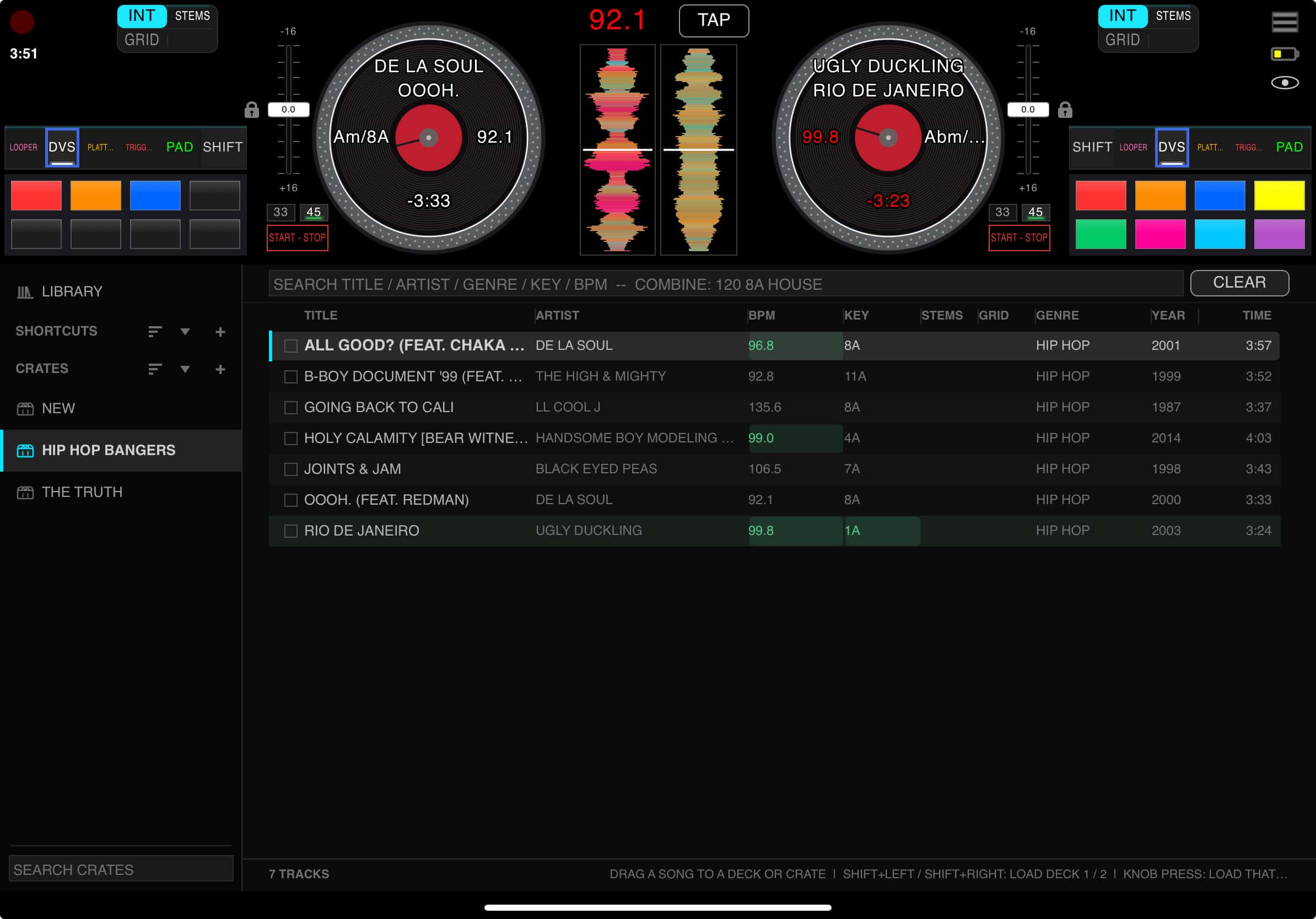
It’s been three months of nonstop work, so this is the biggest update we’ve ever shipped. Version number jumps to 3.0.0 because it earned it. Everything below is documented in the new App Guide on the site: skratchattach.com/learn/how-to. Bookmark it, every feature in this post has its own page with real screenshots from the app.
Here’s what’s new, biggest first.
WAX-ID : a digital fingerprint of an analog record
Play a record once and Skratch Attach learns it. The next time you drop the needle, the app recognizes the track and loads its BPM and beat grid automatically, no file, no timecode, just your vinyl.
A Wax-ID is data about the record, not a copy of it: the acoustic fingerprint, artist and title, BPM and beat grid, and optionally the key and mix markers. Making one takes under two minutes: long-press the centre of the platter to open your WAX-ID LIBRARY, tap + CREATE NEW WAX-ID, press START, drop the record in on the 1, and tap along. The app identifies the record for you (type the name yourself for white labels and edits), grids it, and saves. If you let the song play out, it offers to keep a FLAC archive of the take so you can load that record on a DVS deck later.
Once you’ve got a library, every record you play gets recognized on the fly, the BPM readout goes live, timed FX lock to it, and a song timer counts down to the end of the side. Records that drift get a proper tempo map instead of one number. Your library sorts by name, BPM, key, genre, year, and a star rating that tells you how complete each ID is.
THE DVS LAYOUT: and four control modes
On iPad and Mac there’s a new DVS view built for digital records: a slim band across the top (pads, platters, waveform lanes) with the browser docked underneath, taking most of the screen. Search, find, and drag a track straight onto a deck without opening an overlay. Tap the eye in the top-right corner to switch between Full and DVS. iPhone keeps Full, Mix, and Pads.
Each DVS deck now has a control mode chip in its deck bar:
- RELATIVE – the record is a controller. Scratch, ride, spin back; lifting the needle and dropping it elsewhere does not move the song. Long tracks on short sides.
- ABSOLUTE – where the needle is, is where you are in the song.
- INTERNAL – no record at all. On-screen START/STOP, on-screen pitch fader, and you can grab the on-screen record with your finger.
- SPINDLE – for the Rane One’s own control disc. No timecode, no setup.
You can also switch modes from the deck itself: Shift + Bank Inc on a Rane One cycles them.
Under the hood the whole DVS engine went through dozens of rounds on real hardware: slow-drag feel, sticker drift, fast-scratch tracking, needle lifts, Traktor and Rekordbox timecode support, 33/45 and RPM correction, and a zero-latency key lock that survives scratching. If you ran the June build, your DVS settings get the new tuned defaults automatically.
STANDALONE MODE: no controller required
Launch the app with nothing plugged in and it just runs: both decks in INTERNAL, audio out of the iPad’s or Mac’s own output, everything driven from the screen. Prep crates, test a mix, build stems on the couch. Plug a controller in later and the app asks CONNECT? — say yes and it takes over. If a controller dies mid-set, the reconnect banner has a USE STANDALONE escape hatch.
What it doesn’t do: cue/split cue, metronome, tape recorder. Those need the hardware.
REAL STEMS: made in the app
The frequency isolator is still there for instant use on anything, vinyl included. New is real stem separation: load a digital track, tap the STEMS chip, pick MAKE STEMS (QUICK) or (DEEP), and the app separates it on-device. DEEP takes a few minutes and sounds like separate recordings. Right-click a crate or folder and stem the whole thing before a gig, the queue runs in the background with an ETA. Stems are cached, travel with the track, and key lock works on them (a muted stem stays in key). The separation models download on first use. Already stem with UVR or Demucs? Import your own.
A REAL LIBRARY: browser, crates, capture, AirDrop
The old track popup is gone. The new full-screen browser indexes your music in the background, reads the BPM, key, cues, and grids already in your files (Serato cues included), and lets you search by anything: “120 8a funk” finds 120 BPM tracks in 8A that match “funk”. Tracks that mix with the loaded one highlight in green.
- Crates – app-native, drag-and-drop, pin to top, right-click menus (long-press on iPad). Shortcuts combine crates or watch a folder like a smart crate.
- Sample capture & CHOP – grab a break off the deck, slice it across the pads, save it as a kit, share kits as files.
- Loop Player gets its own browser and record-capture, with a trim editor.
- Crate transfer – right-click a crate, SEND CRATE, AIRDROP. Music, library data, stems and all. The other device offers ADD TO MY LIBRARY or KEEP SEPARATE as a guest crate.
EVERYTHING ELSE
- Views and the eye – Full / Mix / Pads (iPhone), Full / DVS (iPad, Mac). Customize picks the default and which views rotate.
- Settings redesign – full-screen, sidebar nav, controls drawn as hardware, and a UI accent colour (8 presets + a colour wheel).
- Follow Mode – the Live Looper and metronome follow the tempo of the record you’re playing, and keep following it.
- Platter Play – pitch-fader control, Triad / 7th / Build chord voicings, on-pad note names.
- Key lock – new in-house engine, zero-latency on live decks, planned mode for files. Key readout follows the pitch fader.
- Dual BPM – each deck owns its tempo (file > Wax-ID > tap), master hands off automatically.
- Per-deck pitch calibration – measured, not assumed. Default pitch range 16%, cycle 8/16/50.
- Filter – Intensity now drives resonance, with a true bypass.
- Master VU meter on screen, true-peak.
- FX page – one card per effect, and the Rane One MK2 doubled-audio fix (SEND WET ONLY + DRY RETURN) with a help panel. Factory FX defaults re-dialed.
- MIDI mapping – every external MIDI device listed with assignable roles, MIDI learn for pads, faders, EQs, notes, FX and stems targets.
- Keyboard – TAB cycles views, CMD+F / CMD+G search for deck 1 / deck 2.
- Deck loops on files – Loop On/Off, halve, double, driven by the file’s beat grid. Grid editor for digital tracks. (New — please test.)
- New device profiles – Pioneer PLX-CRSS12; RP-8000 MK2 motor driven from Platter Play; platter reverse on Twelve / RP-8000; Rane 70 BPM display.
- Rane One MK2 on the screen alone – on-screen crossfader, FX, and CUE now actually drive the mixer. On-screen SHIFT chip.
- No more OS popups – every prompt is an in-window card that can’t hide behind the app.
- Stability – Rane One disconnect fixed (the keep-alive was never being sent), self-healing MIDI and audio on hot-plug, phone calls and Siri no longer leave audio dead on iOS, first-launch audio crash fixed, landscape-only, 30 fps vector platter everywhere.
Where to start
- Open skratchattach.com/learn/how-to and read Screen tour and Views and the eye – the layout moved.
- Make one Wax-ID with a record you know. Then play it again and watch it load.
- Load a digital track, try the four control modes, and make QUICK stems on it.
What we need from you
This build is enormous and most of it was verified on our own rigs. Yours is different. If something breaks, tell us what device, what view, what you were doing and if you can, send the log (Settings -> Troubleshooting). Deck loops on files, library sync, and the Rane One MK1 on the new DVS layout have had the least hardware time; those reports are gold.
Thank you for waiting. This is the app we’ve been building toward.
— The Skratch Attach team